DatabaseMCP / MCP Server
Database MCP server built into Mini DBA
DatabaseMCP is a feature of Mini DBA, not a separate database product. It lets a compatible AI client ask about live alerts, slow queries, waits, blocking, execution plans, capacity trends, and historical incidents using monitoring evidence already collected by Mini DBA Engines.
A monitoring MCP server, not unrestricted database access
Many database MCP servers are designed to run SQL supplied by an AI assistant. Mini DBA takes a different approach: its monitoring Engines continuously collect operational evidence, and the Console exposes approved diagnostic tools across connected Engines. That gives an AI client useful history and context without making it the primary monitoring system.
Direct-query MCP
Connects an AI tool to a database and executes queries on demand. Useful for data access, but investigation is limited by the permissions, query safety, and evidence available at that moment.
Mini DBA monitoring MCP
Queries the live and historical evidence gathered by dedicated monitoring Engines. It can compare servers, reconstruct earlier incidents, and follow established diagnostic paths.
Compare direct database MCP connectors with a multi-database monitoring MCP server, including the different permissions, history, and operational use cases.
Questions you can ask
- “Which servers have active alerts, and what evidence points to the most urgent cause?”
- “Why was production slow between 14:00 and 14:20 yesterday?”
- “Show the top queries by CPU and reads, then identify plan or index evidence worth checking.”
- “Find blocking, deadlocks, wait changes, or memory pressure that explain this latency spike.”
- “Across all customer estates, which capacity or reliability patterns could become incidents next?”
Real monitoring tools and historical evidence
The endpoint exposes more than thirty focused tools. They cover monitored-server discovery, current performance, alerts, blocking, top queries, execution plans, deadlocks, waits, index health, replication, database growth, connection trends, disk and network I/O, memory pressure, logs, storage, permissions, and maintenance activity. Tool availability depends on the connected database platform and the evidence collected.
Configure controlled access from the Console
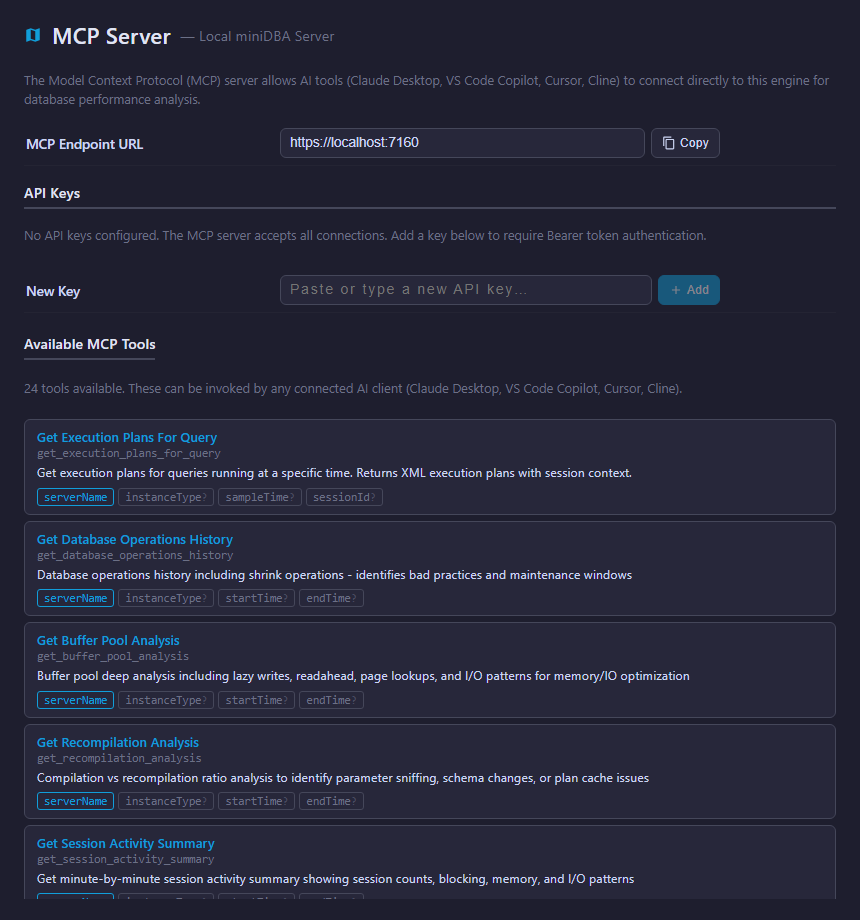
Copy the Console endpoint into a compatible MCP client and authenticate with a dedicated API key. Create separate keys per client so access can be rotated or revoked without disrupting other users. Mini DBA stores only a salted hash of each key; copy the raw key when it is created.
Trial keys expire after 14 days by default and are rate-limited. Persistent keys remain valid until revoked and have a higher default request limit.
Privacy and network boundaries
The MCP endpoint runs with your Mini DBA Console and exposes selected monitoring evidence to clients you authorize. It does not create a public data service by itself. However, an MCP client may send prompts and selected tool results to its configured AI provider. Review that client’s provider, retention, key storage, network route, and data policy before giving it access.
One MCP endpoint across a mixed database estate
Use the same investigation workflow across SQL Server, Azure SQL, PostgreSQL, MySQL, MariaDB, and Oracle. MSP and support teams can ask estate-wide questions across multiple connected client Engines, then drill down into the server and time window that needs attention.
Database MCP server FAQ
Does the AI connect directly to every monitored database?
No. The AI client calls approved tools exposed by the Mini DBA Console. Mini DBA Engines remain responsible for collecting monitoring evidence from configured database servers.
Can it investigate an earlier incident?
Yes. Historical tools can retrieve alert, blocking, deadlock, query, counter, growth, connection, and activity evidence for earlier periods when that data has been collected and retained.
Can an MSP ask about multiple customers?
Yes, where the Console is connected to the relevant customer Engines and the MCP client is authorized. This supports broad estate checks followed by server-specific drilldown.
See database MCP monitoring in practice
Explore the live Console without installing anything, or review the full Mini DBA MCP feature and setup guidance.